It's been about a week of edit and putting the final film together.
Once going though, the VFX film I managed to make has gone smoothly and the overall look to the VFX is really good, making me really happy that it has come together neatly and effectively. I wish I still had more time to add some small extra scenes to the film as I've tried to make it run as smooth as possible for the deadline, however this is not possible as there is little time, but everything has worked smoothly and all elements in the film work together really well. I think the overall product is awesome and I've worked hard for this project on my own.
However I feel the film could have been better if the mishaps didn't arise over duration of the project which lead to stress over certain months however I've managed to complete this film from the very start with ideas into pre-production, all the way to the final piece rendered out at 1080HD. I never thought I would have done a complete film project on my own and learn about so much over this time as I'm so used to working in a group and having the role of editor/VFX.
Things I would do next time for a project like this?
Defiantly have a team/group all committed to the final project, and have fun with it and let it not turn into stressfulness.
Showing posts with label Post Production. Show all posts
Showing posts with label Post Production. Show all posts
Thursday, 7 May 2015

Post production Music, SFX, Voice
Music is one of the most essential pieces to a film.
I found a website which does free non copyright music called HeroBoard and within this I found a artist which is royalty free (Basically can use their music but must not re-sell and must say it's their work) by Ross Bugden who has made some epic scores which I have used and remixed into the film therefore all songs used will be named in the end credits.
SFX
Found a lot of these on a website plus re-creating some, such as when the drones talk it's a combination of a fog horn but digitised and beeps my phone is dying/running out of battery, sadly I had to use a rode mic for this on the camera and record black so I know it's just sound, but I've mainly used audacity to change and manipulate the sounds.
Voices
Just used actors and had Skype calls with some people who were happy to do this over Skype.
James Buck, Greg Shakleberry, Helen Lynskey
All of them helped and I couldn't have done this without them.
I found a website which does free non copyright music called HeroBoard and within this I found a artist which is royalty free (Basically can use their music but must not re-sell and must say it's their work) by Ross Bugden who has made some epic scores which I have used and remixed into the film therefore all songs used will be named in the end credits.
SFX
Found a lot of these on a website plus re-creating some, such as when the drones talk it's a combination of a fog horn but digitised and beeps my phone is dying/running out of battery, sadly I had to use a rode mic for this on the camera and record black so I know it's just sound, but I've mainly used audacity to change and manipulate the sounds.
Voices
Just used actors and had Skype calls with some people who were happy to do this over Skype.
James Buck, Greg Shakleberry, Helen Lynskey
All of them helped and I couldn't have done this without them.
Post Production Breaking down scenes
Going though each of my CGI scenes in the second half of the film and explain what I did and why.
Oringinal
 This is where I started from and same for most of the CGI scenes
So black template
 Moving on to the location
 For this I wanted somewhere abandoned and could be moved to any other scene in my film if needed which was useful as this was a nice spot.
This is the base template for the character so by using a reference shot with my actor and the pink arm bands I can use maya to get this.
 So here the character is placed however him and the background are both very sharp therefore by using a Mat Channel, and the alpha layer I could break the two apart and make a depth of felid on the VFX.

So above you can now see the background bridge is blurred so the focus remains on the CGI character and the foreground to the right is in focus making the scene feel natural to the audience. I have done this because if it stayed all in focus there would be too much information to take in therefore by breaking it down into this is focused and this isn't the audience knows where to look.
This next scene I did was clever, as I had lost my footage at the factory for the showdown so had to make up something to fill the gap, therefore a recording of that event.

So the main focus is here in the palm of the hand which is just off centre of the screen, but looks nice in the framing, because of the shoulder in the shot it keeps the focused on the hand, plus the factor of the movement in the picture.
 I decided to recap the last moments as if the CGI character was watching the film just like the audience was so that there is a connection between the two subjects.
Jumping into the VFX
 As you can see the Lines where added in to emphasis the hologram/recording as it looks boring without one on

And now without the footage just a hand with a blue light from maya super boring and a weird hand...
 But here is the original footage
Just a recording of the under the bridge on a different day without the actor so difficult to figure out where the placing should be, but with slight colour correction with the hand on and off to get a nice balance of contrast.
So making the Holographic lines/playback lines.

There was some tweaking to this as I stated my comp as a white Template and then masked areas off with black solids and animated them with a controller so the "rolled" down the view creating the illusion of the holographic/playback recording.

Next section the walking
A very interesting part as referencing the actor to the CGI model was different as I copied the moments to the best of my abilities plus the go pro on him to make a first person section if needed however I ended up using the gopro footage as the actors movements plus camera shake broke the illusion of the figure walking down the forest path.
Final version
 So as you can see a bleak moment during the day just before finishing, it turned dark and cloudy on us however later the Cargo section was the sunniest part of the foot therefore by cross referencing I could get/re-create the sunlight in the footage making the film flow nicely and not have any sudden colour change.

Still from the GO pro the actor was wearing and sadly I would have liked to use the footage with the actor but it doesn't work therefore had to use the maya refernce and place the GoPro footage as the movie plane and add tweaks as it went along.
 Even after the maya CGI movement still had to make tweaks to make it believable.


Overall I'm very happy with this section as the maya render and worked so smoothly to create this Model and looks beautiful on the whole.
Drones Flying,
Most fun and difficult section in the film.
 Between these two images above and below, the top being final version and below original, So leagues of difference here.

After the Drones were finished in maya and exported and put into after effects the first thing to do was this... the drones needed to be masked behind the trees to get the depth of field and not breaking the illusion of them flying through the trees.
 So as you can see below with the tree masked it swoops/flies behind it and then reappears giving the feeling of them being real within the scene and interacting with the BackGround.
 Adding detail to these drones.
As one of my drones looks directly at the audience on purpose to be intimidating I rendered out a secondary ambient occlusion so...
 That the model would have more shadow and become apart of the scene however this isn't enough.

Because they are flying around they couldn't be full focus all the time therefore a blur was applied with a 2frame delay so it could slightly track wear the drone was flying next, however the effect is only slight but it has made a huge difference on the model within the scene.
 With the drone flying up and close I'll have to adjust this and create two layers on for the background drone and one for the foreground to have different levels as i want them to communicate to each other as they fly down.

Second point is the leave as I need a sound here to push them off the screen, and to leave a impact before the next scene in the film.

Oringinal

So black template


This is the base template for the character so by using a reference shot with my actor and the pink arm bands I can use maya to get this.


So above you can now see the background bridge is blurred so the focus remains on the CGI character and the foreground to the right is in focus making the scene feel natural to the audience. I have done this because if it stayed all in focus there would be too much information to take in therefore by breaking it down into this is focused and this isn't the audience knows where to look.
This next scene I did was clever, as I had lost my footage at the factory for the showdown so had to make up something to fill the gap, therefore a recording of that event.

So the main focus is here in the palm of the hand which is just off centre of the screen, but looks nice in the framing, because of the shoulder in the shot it keeps the focused on the hand, plus the factor of the movement in the picture.

Jumping into the VFX


And now without the footage just a hand with a blue light from maya super boring and a weird hand...

Just a recording of the under the bridge on a different day without the actor so difficult to figure out where the placing should be, but with slight colour correction with the hand on and off to get a nice balance of contrast.
So making the Holographic lines/playback lines.

There was some tweaking to this as I stated my comp as a white Template and then masked areas off with black solids and animated them with a controller so the "rolled" down the view creating the illusion of the holographic/playback recording.

Next section the walking
A very interesting part as referencing the actor to the CGI model was different as I copied the moments to the best of my abilities plus the go pro on him to make a first person section if needed however I ended up using the gopro footage as the actors movements plus camera shake broke the illusion of the figure walking down the forest path.
Final version


Still from the GO pro the actor was wearing and sadly I would have liked to use the footage with the actor but it doesn't work therefore had to use the maya refernce and place the GoPro footage as the movie plane and add tweaks as it went along.


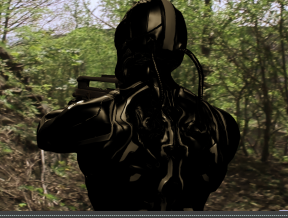

Overall I'm very happy with this section as the maya render and worked so smoothly to create this Model and looks beautiful on the whole.
Most fun and difficult section in the film.


After the Drones were finished in maya and exported and put into after effects the first thing to do was this... the drones needed to be masked behind the trees to get the depth of field and not breaking the illusion of them flying through the trees.


As one of my drones looks directly at the audience on purpose to be intimidating I rendered out a secondary ambient occlusion so...


Next thing would be sound as it can be normal levels around -6db here however


Second point is the leave as I need a sound here to push them off the screen, and to leave a impact before the next scene in the film.

Wednesday, 6 May 2015
Post production - Drones plus Cargo
One of my scenes contains both the drones and a cargo.
So for starting off is a relaxed, we have the cargo scene below with all the effects on it, these effects are the Drones,Cargo create and the grass at the base of the cargo crate to make it seem apart of the background and not stick out.


As you can see the ball is yellow so easy fix with Curves effect ect then into the shock waves/blast below
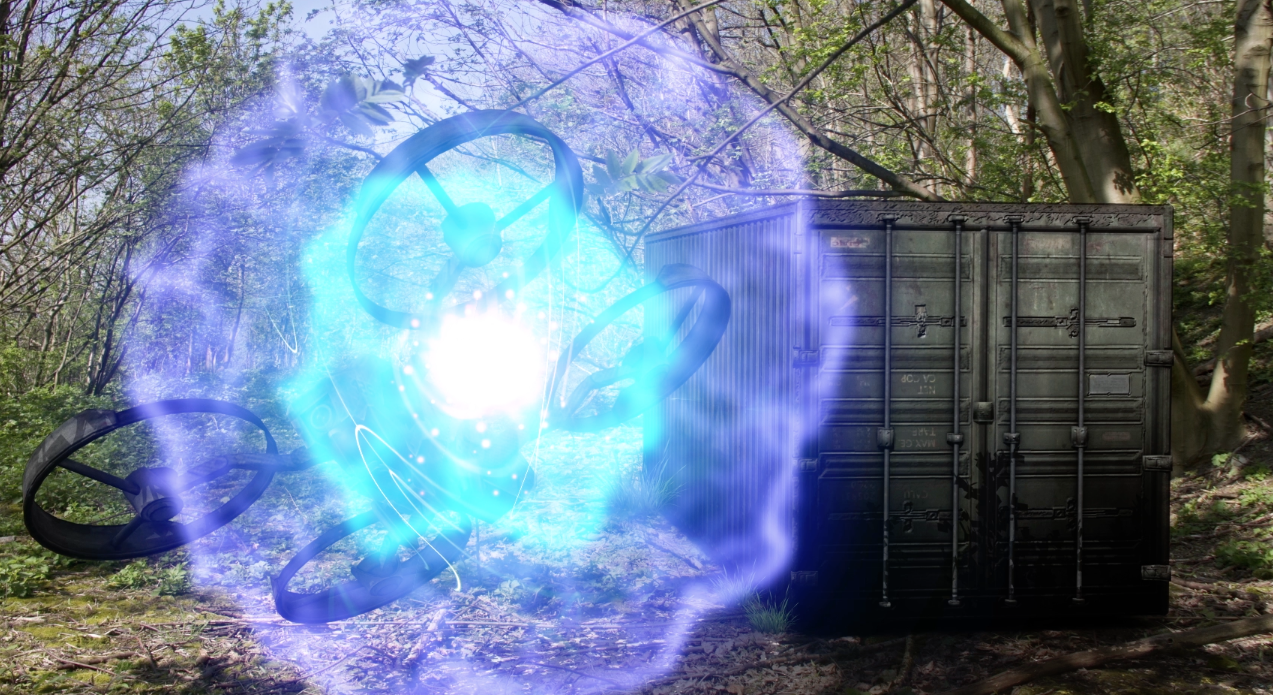
Overall with all the elements in this scene all put together will make this scene become to a high quality however they are just animations which run smoothly but without sound they will be lifeless...
Next thing to focus on is the sound for the trailer with the Back Ground sound included however I think at this pace which I've got going I might be able to finish all of the film and render it out in time.
So for starting off is a relaxed, we have the cargo scene below with all the effects on it, these effects are the Drones,Cargo create and the grass at the base of the cargo crate to make it seem apart of the background and not stick out.
This image is showing the blasts which destroy the drones, for this I created my own energy ball, combined with particle effects for a explosion,
As you can see the ball is yellow so easy fix with Curves effect ect then into the shock waves/blast below
Overall with all the elements in this scene all put together will make this scene become to a high quality however they are just animations which run smoothly but without sound they will be lifeless...
Next thing to focus on is the sound for the trailer with the Back Ground sound included however I think at this pace which I've got going I might be able to finish all of the film and render it out in time.
Post Production - Drones
These drones have been Tricky for me, as I've been created them from very basic level and not as a fully model object, therefore they are grouped and proved a pain when animating sometimes.
 Heres a Quick Ambient occlusion of the drones making natural shadows on them to improve the look when placed into the final product.
I started this model off by creating the body then creating the arms seperate to the base model and the same is for circle flying section. This is Fairly bad in terms of animation and game design however I can get away with this as it's for CGI and the final render is what counts.
The combination of the Drones and the Sci-fi soldier work well to create the atmosphere of the film plus by using real world footage for the drones gives them reference and helps me for the final product.

This is a shot for the final product with the drones being masked though out the scene to create them passing by the trees to imitate distance of the drones.
Overall I'm happy with the way this has come out and the only things that will need to be altered is the colour correction so that film flows nicely.
Overall the pros of this scene is that the drones fly at the camera to make them intimidating, but to makes the scene even better the sound for these guys will be key to bring them to the full potential.
Cons of this a lot of masking of trees to have the scene look awesome and not "flat" by having the drones sit on top of the film layer.
I started this model off by creating the body then creating the arms seperate to the base model and the same is for circle flying section. This is Fairly bad in terms of animation and game design however I can get away with this as it's for CGI and the final render is what counts.
The combination of the Drones and the Sci-fi soldier work well to create the atmosphere of the film plus by using real world footage for the drones gives them reference and helps me for the final product.
This is a shot for the final product with the drones being masked though out the scene to create them passing by the trees to imitate distance of the drones.
Overall I'm happy with the way this has come out and the only things that will need to be altered is the colour correction so that film flows nicely.
Overall the pros of this scene is that the drones fly at the camera to make them intimidating, but to makes the scene even better the sound for these guys will be key to bring them to the full potential.
Cons of this a lot of masking of trees to have the scene look awesome and not "flat" by having the drones sit on top of the film layer.
Post Production - CGI character
This is the Character which I bought online. Sadly the model wasn't already rigged and set up therefore had to put a rig and controls onto him.
.png) So this is him in a testing pose before using the reference footage with maya to re-create the actor moving around.
So this is him in a testing pose before using the reference footage with maya to re-create the actor moving around.


.png)

.png)

Overall I've enjoyed using this model for the CGI parts of my film. The Animation though out went smoothly and the overall look to them was good at the end. Above you can the textures and bump mapping coming together to create a good scene and testing it before placing it into the final product, overall with the CGI character I'm happy with it since I've been the only one working on it and making the bump maps, along with the rendering of Maya's mental ray the final product will look really good.
Despite being on my own I think I've worked really hard to produce this level of quality work for my final project, granted it's not blockbuster level, however I wouldn't have thought I could accomplish this fully to the end and that I may have to make a trailer instead of a full film...
Overall I've enjoyed using this model for the CGI parts of my film. The Animation though out went smoothly and the overall look to them was good at the end. Above you can the textures and bump mapping coming together to create a good scene and testing it before placing it into the final product, overall with the CGI character I'm happy with it since I've been the only one working on it and making the bump maps, along with the rendering of Maya's mental ray the final product will look really good.
Despite being on my own I think I've worked really hard to produce this level of quality work for my final project, granted it's not blockbuster level, however I wouldn't have thought I could accomplish this fully to the end and that I may have to make a trailer instead of a full film...
VFX Title
From doing a few requests from clients asking to make a VFX template for channels and company names within After Effects I thought it would be best to create something within After effects using my knowledge.
For this I decided to use the lightning effects and change the attributes to make them look very digital as if they are making a circuit within a computer. I decide this because of the Sci-fi theme of the film plus it makes a interesting view for the title to sit on or be revealed by the digital lighting.
From the time lapse above there has been a lot of tweaking and playing around in order to find what would be best for the into... overall there are skips in some areas as I've been tweaking to make the finished product to my liking.
Time lapse here
After a lot of playing around tweaking I finally came up with this which is shown in the development as a full run though as the load times were difficult at this point due to the video cache being nearly full at this stage.
Overall I'm happy with the end result and there isn't much I would change to this title beginning.
Pros
Done this before so happy to do again.
Fun area to try out new and different things while making something awesome.
Cons
Loses the traditional Title in moves
Finding the best way to fit the sequence into the final film.
For this I decided to use the lightning effects and change the attributes to make them look very digital as if they are making a circuit within a computer. I decide this because of the Sci-fi theme of the film plus it makes a interesting view for the title to sit on or be revealed by the digital lighting.
From the time lapse above there has been a lot of tweaking and playing around in order to find what would be best for the into... overall there are skips in some areas as I've been tweaking to make the finished product to my liking.
Time lapse here
After a lot of playing around tweaking I finally came up with this which is shown in the development as a full run though as the load times were difficult at this point due to the video cache being nearly full at this stage.
Overall I'm happy with the end result and there isn't much I would change to this title beginning.
Pros
Done this before so happy to do again.
Fun area to try out new and different things while making something awesome.
Cons
Loses the traditional Title in moves
Finding the best way to fit the sequence into the final film.
Post Production - Muffin Button
Very early on in my film I introduce this button which can produce muffins therefore called the muffin button.
Since this isn't a real thing I decide to model a emergency stop button used on factory machines,
 Here is a two minute time lapse of the making of the muffin button.
This is a quick example of how it will fit into the scene.

Overall I wish to keep the information about the Muffin button until the end credits
Quickly looking at the shot above there will need to be a lot of editing to this in order to make the button sit within the scene. As of now it looks very fake, but the end product will look good.
Since this isn't a real thing I decide to model a emergency stop button used on factory machines,

This is a quick example of how it will fit into the scene.
Overall I wish to keep the information about the Muffin button until the end credits
Quickly looking at the shot above there will need to be a lot of editing to this in order to make the button sit within the scene. As of now it looks very fake, but the end product will look good.
Subscribe to:
Posts (Atom)