Showing posts with label VFX. Show all posts

Sunday, 30 November 2014

Development of Robot arm.

My first plan of action was to find as many things to do with cybernetics in today's world and future/sci-fi.

From looking up this research I found images and placed them onto a moon board as shown below.


 It's very interesting to find out that some of these pictures are real and that modern science is able to create robotic arms for people by using electric pulses. By using electric pulses which the brain sends out to that area of the arm and the robotic arm picks up this signal and then moves the arm.

However some people can't adjust to this due to a psychological problem called ghost ligament syndrome, this means they believe it's their arm moving however their brain cant cope because they see it's a robotic argumentation their brain can't understand and sends the wrong signals are sent to the machine causing it to malfunction.

From this information it could be used in my Story Trailer.

Building the Arm

To start off I knew that I would be going for an arm because I can use the P.O.V angle on the camera to get a feel for having a robotic arm through the viewers eyes.

These are very basic designs which is want I want at present because the time era is now but  not futuristic so design has to good and not perfect as in Sci-Fi films.  Moving from right to left the first design was a very basic one to test with match mover, a 3D tracking software which I'll be using with the final product. My second test was made as a whole piece of geometry and it looks good however the rigging will need a lot of development because the model becomes unrealistic as it bends a lot. The final model is the one which I shall be using as it has been made with separate pieces, but parented together to make it more robotic and the rig works well as it uses the different parts of the model.


Building the Hand
.

Using the same design idea on the hand I wanted to make it very simplistic because hands can be come complicated, also the individual geometry works because the rigg interacts better for the robot hand. Although I would do this on a human hand and use normal geometry it would look odd in this case because it's a robot hand, so using simplicity works nicely.

Tracking Hand and Arm.

Quick Practice with the 3D tracking Match Mover. I'm using a tutorial in this and also the animation studio in the background consequently the actor with the glass is the digital tutor. In this I started with a 2D plane and then changed to 3D afterwards because it was a rectangle. In my case it would be best for me to start in 3D then add the depth of field.

Starting with my hand to track.
In the picture I've added black marks to my fingers to place the tracking points in Match Mover
This worked well until the points were not readable by the tracking system because the overhead lights were reflecting the points. I therefore had to go to key framing for the tracking points to verify  their movement to see if they were correct.


 In Match Mover adding tracking data.

The next step after this process is to get the tracking data into Maya and use the tracking data with my model.


The screen above shows every tracking point recorded by my hand in the first 24 frames.
This was quite stressful because of the mirrored and the data was too complicated for me to isolate the information I needed. I continued working and followed my online guide.  
Thankfully this was very productive. Below is the arm with the influence of the tracking data (which is hidden)

 So now it was just a matter of piecing it all together

The background.

Adding the arm and removing the black background from it.


Thursday, 27 November 2014

Robot Arm motion tracking tester

Using motion tracking to create a smooth movement on the model.


Overall I'm very happy with this however for such a short video it meant a great deal of hard work. Key framing the model would have been faster.

Therefore when I do my film trailer I'll do motion tracking if it's a long complicated shot or keyframe if its a small shot with the VFX arm.

Thursday, 23 January 2014

VFX Evaluation.


In preparation for making this VFX film, I looked at a lot of VFX companies such as Double Negative so when it came to making a story board/idea of a film I wanted to make it became very hard because I kept on thinking way to big, and couldn't narrow my ideas down. Later on we did tutorials on making VFX within After Effects and Maya, from this it began to put limits on my ideas of what i could do, however I couldn't put a final idea down, therefore i looked at students/peoples VFX films on Youtube and this was very useful because I was trying to make something original however a lot of the videos used the same assets but manipulated them to look different and awesome.
After this I came up the idea of making a origins type story for a super hero, but what power would he have? I lucky had been playing a few games with super powers so I looked at all on them and the looked on Youtube for tutorials on many of them. Lighting was the main choice with it being common in most games and VFX films so from there I started to practice the lighting tutorials.
The next thing was who was going to be in it?  I thought that one main actor was needed for this as I was focusing on a origin story so anyone else would have been a extra. 
Costume for him was basically what he would wear naturally in this modern age so that wasn't too hard.
Location for the Film was going to be tricky because there are many people who could damage equipment and mess up the production of the film, and I have to think about time of day? In the end I used the small car park just outside my flat where it is spacious and not too busy, accept from lorries delivering to the shop, therefore I knew from living here that the lorries would be in the mooring and so we could film in the afternoon without much interruption.  I think I should have done a lot more testing then looking at tutorials on how to get the best effects, because I was only looking at the lighting and nothing else really and how people did this, therefore next time I’ll be looking at more effects and not finding one amazing one.


The day of the filming went very smoothly, there were hardly any cars for the look out to call out and since it was in the afternoon the sun lit the area naturally and the car park wasn't dark. The only problem was a little contingency from one car leaving which was in the background so we shoot that scene again just to keep the background the same.
Sadly after filming there was one scene, which I forgot to turn on the microphone we, I have lost a little bit of audio, which wasn't a major loss. For next time if filming I hope for it to go as smoothly as this one because we had no problems, however I think the people knew we needed to get this done so that they would be needed to the next day if there wasn’t enough footage.


I started my Post straight away colour correcting the footage I wish to use due to the fact of it begin a lovely shade of blue which the only cause it the white balance so that heavily annoying because it cut into the post schedule, after this was complete placing the lighting effects was fairly quick with tracking on the Actor and the stone. However my Tutor asked if that was all I'm going to use, sadly this was true and that it doesn't show any real use of VFX from what we learnt. Therefore back to the tutorials on Youtube to find different methods, which don't use After Effects. Maya came up and that was very useful on how to do it. I thought from this it would put me back in my schedule however it only put me back a day, which i would have to recover. 
When the lighting was complete and film put together it only came to 47 seconds so I had to fill in the extra 13 seconds. 
Reviewing the footage I thought i could add in a thunder cloud roll in to emphasize the lightning powers activating in the film and creating a different mode compared to the start, this lead me back to Maya and the particle effects. It stared off well however the clouds didn't look effective compared to the lightning effects. So i researched into making clouds to my surprise I found some really good looking ones with a tut, however mine came out really, badly this is put my effects schedule really behind a bit before the upcoming Critical Analysis, I panicked, for a while and trying to find out way it didn't work but after a day it came up as it did in Mental Ray within Maya I decided to save this and render it out on the better computers compared to my laptop. I did this fitted it the film and I still had 7 seconds to fill so looking at the film again I noticed the actor lifting his arms to shoot lighting and thought to put a skyline shot with the lighting in Maya to show the lightning being released into the sky. I did this and I thought it was complete, sadly I was wrong because when my flat mate looked over it he asked "where is the rain?" It felt like I had been hit with a idiot sign, so with the Critical Analysis pretty much round the corner I went into Maya created a plane for the rain particles to hit and bounce to add to the scenes in the film, in certain places which I managed to do somehow?
Here I wished I spent more time looking into different effects and not focusing on the lightning however it was the main element in the VFX film and looks good. The clouds in Maya gave me hell beyond imaginable, so next time look at every option available and talk about what I’m doing so people can give feedback therefore adding to the project


Sound was Interesting for me because trying to find the right sound that I had hoped for didn't quite work out.  I used clips of thunder going off and rain effects mainly which worked well as build up and lightning scenes as effects layer one, this could have been very bad due to the mixed up of sounds not working together and having a major issues with the pitch. Then recording sounds in Leeds to get the feel of a city at the start and continuing though out as background noise, this was difficult to find the right area for the noises which I wanted therefore next time if I wish to do this I will need more time so that I can use all the sounds together into one single clip. For the actual lighting I paid for some Star Wars effects which I then manipulated in Audacity to have a more screeching effect, so that it was a shock to the audience that something major is happening, I think this was a good move due to the time issue and all the effects on the track was very useful; however putting it into the sequence, I need to seriously change the pitch of the noise and get every thing on the right levels so it would have the impact I was looking for without destroy the speakers, or hurting ears.  One problem here was finding the sound but it was fine because I knew it would take some time, however I believe for next time in the module to pre plan what sounds I will be using and get them early on.

The Critical Analysis. I was really hoping here that the film was pretty much done and needed little to no tweaking at all. This was correct and the only feedback was it was awesome and there were no contingency problems, the only thing was the rolling clouds didn't quite fit t in the scene, but that cloud be easily fixed.  So after tweaking that little bit and adding a credit scene the film was done.

Overall I have really enjoyed this module, I have found doing this module, using a schedule is very IPORTANT for project organization, however since I planned everything quite late in due to not coming up with an idea which I could stick to there wasn’t enough time to add much extra or to do testing before putting it into the film therefore this leads to very late nights and early morning which isn’t good for productivity. Next time get a idea and stick to it as best as possible to give enough time for any problems.


The History of VFX part 2

Yellow Screen.
There is only few cameras in the which can do this and they are all owned by Disney. A specially coated prism in a covereted film camera captured it onto a black and white film while the normal light was captured to the regular 3 colour strip.

While the sodium vapour process produced some of the best results for composting this way only disney had the cameras, and they didn't rent them out.
So then film makers and to refine the blue screen technique until it as good as disney's yellow screen.

Then it moves into the today with the green screen because it was easier to light than blue and in most clothing for actors it wasn't that common and with the industry using digital film now the sensors capture trice the amount of green as they do blue or red, making it easier to key a green screen.

Toy Story.
The first ever completely computer generated film.
Pixar created all the computer imagery for the production.


Double Negative.
Is a studio created specifically to provide VFX support to a film.
They are renowned for their work on the 'Dark Knight' trilogy and the 'Harry Potter' series 


I'm ending with this studio because there are many other out there but within the last 100 years of film VFX it has expanded so much from the simplest trick of illusion to full on CGI films such as Pacific Rim and Iron Man.


Iron Man 2
Without VFX.


Song of Two Humans
Showing the Travelling Matte.


Pacific Rim
VFX film. 


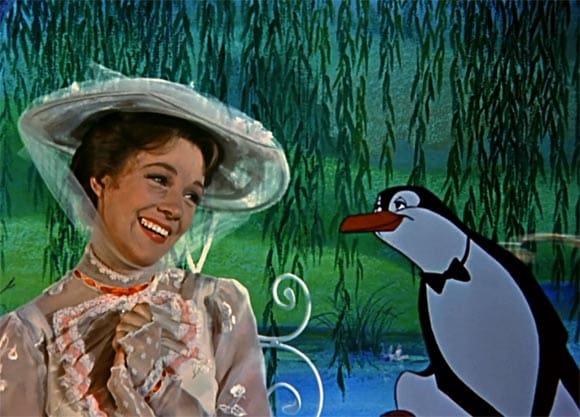
Mary Poppins
Yellow screen with a animated background.

The History of VFX

VFX started back in the 1895 and was produced by Tomas Edison and the film 'The Execution of Mary Queen of Scotts' was directed by Alfed Clark

However this was only a short film. Metropolis is considered the first full length science fiction feature film ever made. The visual effects were designed and overseen by Eugen Schufftan. 

Eugen uses mirrors to manipulate the set in order to create the visual effects as shown below.


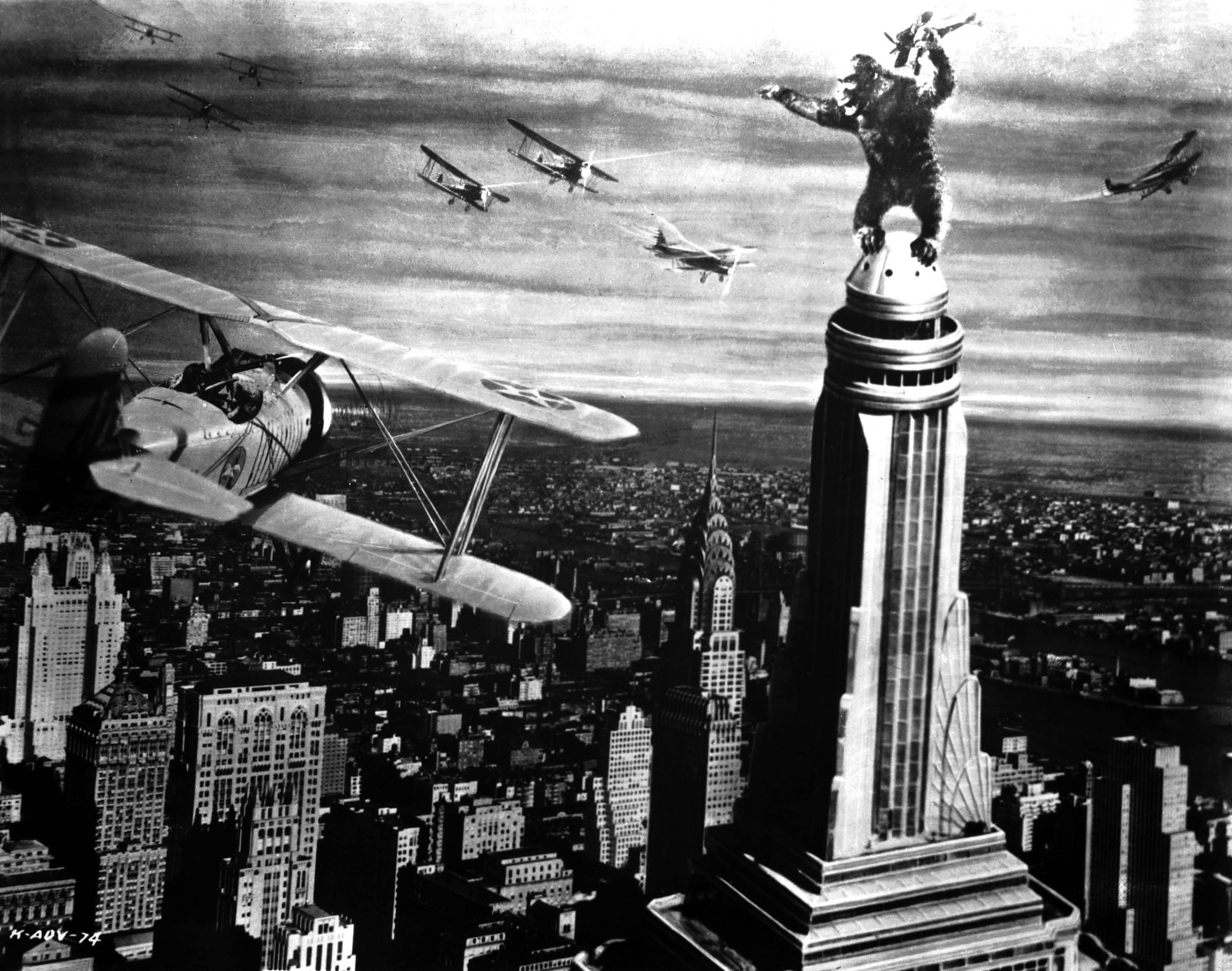
KING KONG
A classic monster movie made back in 1933 by Merion Cooper and Ernest Schoedsack.

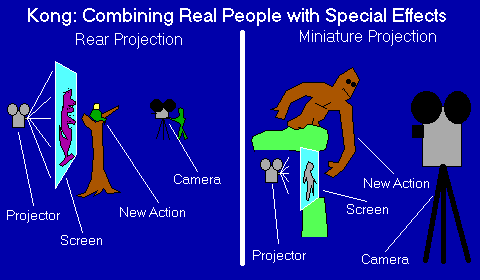
They created this effect by uses stop motion on the great ape, along with the use of a projector.

They did the action in the right side first as it was the stop motion models, then projected the images behind the actors and to react to whats happening.

The effect of this is very similar to the green screen and placing a back drop, which they didn't have back then.


Un Homme De Tetes 1898

inn this film Melies used a double exposere technique to create composite shots which were blocked out by black paint on a sheet of glass, this film was then rewound and a new piece was added to block the areas which where already filmed.

This then leads to the Glass matte effect created by Norman Dawn
With this film makers could augment their sets. the glass sheet contain elements which where not there and created a mask between the subject, actor and camera. The down fall of this was the painting had to be ready on set each time, however the could get round this by making a black screen over the part which was going to be replaced with the paint area.

Black Screen

The problem with the mattes is they had to be still until black screen came in and was then renamed to the travailing matte. they did this by filming with a black background and then increasing the contrast so the figures became white and copied them onto a piece of film then the original was then placed on top.


'The Theif of Bagdad'

The first film to use 'Blue' screen, and won a oscar for the visual effects.
In order to do this they had to use the Dunning effect.

 They highlight the subject in yellow and the backplate is blue creating a smooth removal, however the dew back to this process is the yellow subject therefore it works for black and white films however the their of bagdad manipulated this process.
They used 3 strips of technicolour film, this process used a optical printer which removed the requirements of multiple exposer.

So the actor was filmed against the blue screen.
Shot using the tricolour film strip which was then separated, then on the blue layer created the travelling matte and place correctly then the red and green strips place back over the top to make this remarkable travelling matte and amazing VFX in 1940.


Wednesday, 22 January 2014

VFX Post Production Critical Analysis

This is the final film which I showed to my peers.


The feed back was that the film was "awesome""good"
The glass on the actor was continuous, good use of lighting by using 3d.

However there was a few things in which I could improve was the rolling clouds coming over the top of the building could sit in the movie better.

Overall I found this small bit of feedback very useful because it shows I have the key elements in my film and not much to improve upon for this beginners VFX film.

Tuesday, 21 January 2014

VFX Post Production:Clouds and Dark Sky.

This was the hardest part because I couldn't just mask out the areas of the sky because it just didn't look right or feel like a dark storm approaching, sadly I could capture any footage due to there begin no storms, so I looked online and found some tutorials but sadly there where all basic and looked bad.

However in maya there is a built in particle system called fluids and that you could create decent clouds from.


http://vimeo.com/30189748  And http://vimeo.com/30191625
These are great examples of what I'm trying to achieve however after trying to creating something similar I got only this.


Sadly they don't look fluff at all, and not like a thunder cloud so I'm going to fiddle with the controls in the attributes of the cloud which is a pain because this is unknown area for me with very little guilds on it.


Here is my second attempt of creating the storm cloud with a slightly different tut which is to make fog. In this one I've managed to change the density of the cloud/fog to be more of it and less spread out to look like a dark cloud and changed the colour to a odd teal colour which is showing progress.


After a lot of figuring out and tweaking I manage to generate these clouds which are fluffy and look like a thunder storm is coming all I have to do now is create a back plate of a clear blue sky to show the transition of the clear day turning into a stormy day, to do this I put yellow point lights to flash to resemble lightning/thunder


This is the final dark cloud/ thunder storm. I am really proud of this since N Dynamics on  Maya is incredibly hard to achieve but this will look real good coming over the roof.


Overall I would love to do this again and have a play with the controls to see what I can create in the N Dynamics of Maya, however give myself enough time so this isn't rushed and could be more improved upon.

VFX Post Production: Creating the Lightning.

In After Effects there is a lightning simulator called Advanced Lightning. I had watched many tutorials  on how to use this and create a lightning bolt and animate it.  I started to use this, however I couldn't get it to look right and on my actor it looked awful.


The lightning on his arm looks effective, however it doesn't feel powerful and not a shock to the audience which is what I'm looking for. Another thing about this this is that the lightning effect doesn't glow bright enough catching the audiences eyes to the effect and not losing attention to the film.

I then found a tutorial in Maya which surprised me, but after a quick test it looked like this.

I this a lot because the lightning looks more effective, but in after effects you could see the actual bolt, so I'm going to have to changer some of the effects in maya and change the colour from a very strong teal colour to a light blue/purple colour.


Here is the final version of my lightning test. I have change the colour to a darker teal because the purple looks bad. Next I changed the glow setting on the lightning beams/bolts to variate from very little so you can see the bolt but also have the bright glow, with this I can keep the audiences eyes on my actors hand showing showing there is something is happening in his hand and it effects his body.


When I used the Maya Lightning on this stone I didn't like it at all so I used the Advance Lightning in After Effects. When i was animating the lightning over the rock i used tracking to make the animating stay to the rock due to camera shake.


In this scene using the Maya lightning and manipulating it around his body, to do this I made a proxy model of the actor and put the lightning around it to making look like it was going around his body and charging up his lightning.


Lightning created in maya and had all the starting points at the base and made them shoot up with them moving across the top.

VFX Post Production: Rain

After creating the second version of my film, I showed it to my flat mate and she asked where the rain was, At this time I felt silly forgetting this Important aspect.

Luckily I knew how to make rain in Maya however it came out like this.


Now I really like this, because of the glow of the lightning reacting with the rain droplets but one major problem is the amount of rain drops. This then lead me to the tutorial.


This help add to the illusion of the rain hitting the ground which was good however because of the rain now being thin and unable to be seen when it was rendered out became a new problem so I had to discard this effect and try something else.


I found this VFX breakdown of a car in the rain on vimeo and later on youtube, but on his Vimeo account he talked about how it did it and it was a combination of After effects and maya.
It was the mix of the maya bounce when particles hit the floor and the AE's particles plus something called CC Rain simulation.


This is just a basically a layer of rain not interacting with anything, but then if I then use the particles in after effects and hit off my actor it could look realistic however this would be a very big risk to take dur to time not being on my side!


This rain here is the maya rain coming in and as you can see I'm trying for it not to look to heavy but it begins to build up in to a heavier rain.


This is the only scene which is using both CC rain simulator and particles to emphasise the amount of rain falling on him and making the floor look wet and reflecting some areas of the image to create the illusion.


This scene I'm just using the CC Rain Simulator which really effective, however does quite have the same amount of depth as the scene above, this is very interesting to know for future reference to use particles and CC rain if there is subject to keep focus on.

Friday, 3 January 2014

VFX lightning tut

I found this tutorial on youtube done by 'Surface Studio'

Though this tutorial he explains the basic on the Lightning effect within after effects and how to control them. I found interesting is the whip tool and expressions to make the lighting animate it self over time this tool/expression could be very useful later on in my project.


Lightning tut 2


In this tut he uses a adjustment layer, over the top of his film then follows it with effects -> Obsolete -> lighting. From here I would get a very thin lighting, this is very different compared to the Advance Lighting as it doesn't glow as effective but within after effects I can use the glow effect on the adjustment layer to add realism and for the lightning to sit better in the scene.
I think I'll might use this lighting effect more than the advanced light due to the advanced lightning being very stiff and acts like lighting which strikes from the sky.


Maya Lightning (22/01/14)


I found this while looking around for better lightning effects other than the presets within After effects and use composting to reach a better understanding of VFX and not heavily rely on After effects to save the day. So here I watched this, sadly there was no talking just where to click so the rest I had to find out by my self, which was fun and was annoying due to the fact that I couldn't change the colour in the normal area but in the Attributes to control what the lighting does.


Here is my version of the lightning effect, as you can see from the default above I've change the colour of mine to be more blue teal ish colour which reassembles real lighting striking from the skies.

As a test run I really like this and think I will be using this effect in my VFX film.

Thursday, 28 November 2013

VFX Making Lightning

From youtube I found a very good tutorial to follow on how to make lightning.

from him I was able to make these two videos; first was a test to see it work then secondly applying it to my model/actor for the vex video.

http://www.youtube.com/watch?v=hQx7rIPxaIU  (Videos couldn't be found)

This one is just seeing how the lightning works and also using the particle effects to test as well.

http://www.youtube.com/watch?v=3X8Rluq8fVo (Videos couldn't be found)

Lightning in the palm of his hand as a test shot in my video and here I'm using the Dragon Ball z effect a little bit on the arm which looks really effective.

VFX - Extra, DBZ Super Saiyan

As I was Making the test videos and creating my Power Point Crit presentation I realised another lightning usage on Dragon Ball Z when they transform into Super Saiyan 2.


Gohan SSJ2 Vs. Cell

Goku and Vegeta SSJ2


I really think this effect is really cool and makes the character even more powerful then he already is, and I will using this effect in my video.

Monday, 25 November 2013

VFX - Character test shots


These are pictures of Stuart Brown, who shall be playing as the main character in my VFX film so, I decided to take these quick pictures as a semi-animatic set but also test shots for the out fit which I do like a lot and hopeful will contrast with the blueish lightning.